The Power of Autonomous AI Agents — Without the Command Line.
Die volle Kraft autonomer KI-Agenten — ganz ohne Kommandozeile.
Aurao wraps world-class AI engines (Claude Code, OpenAI Codex CLI, and Google Antigravity) into a calm, welcoming desktop assistant. Organize folders, summarize stacks of PDFs, and draft documents with 1-click safety approvals.
Aurao verpackt führende KI-Agenten (Claude Code, OpenAI Codex CLI und Google Antigravity) in einen ruhigen, verständlichen Desktop-Assistenten. Ordner sortieren, PDF-Stapel zusammenfassen und Dokumente erstellen — sicher per 1-Klick-Freigabe.
Portable single-file Windows 10/11 executable · No installer or admin rights needed · Or run winget install badnexus.Aurao
Portable Einzeldatei für Windows 10/11 · Keine Installation oder Admin-Rechte nötig · Oder via winget install badnexus.Aurao
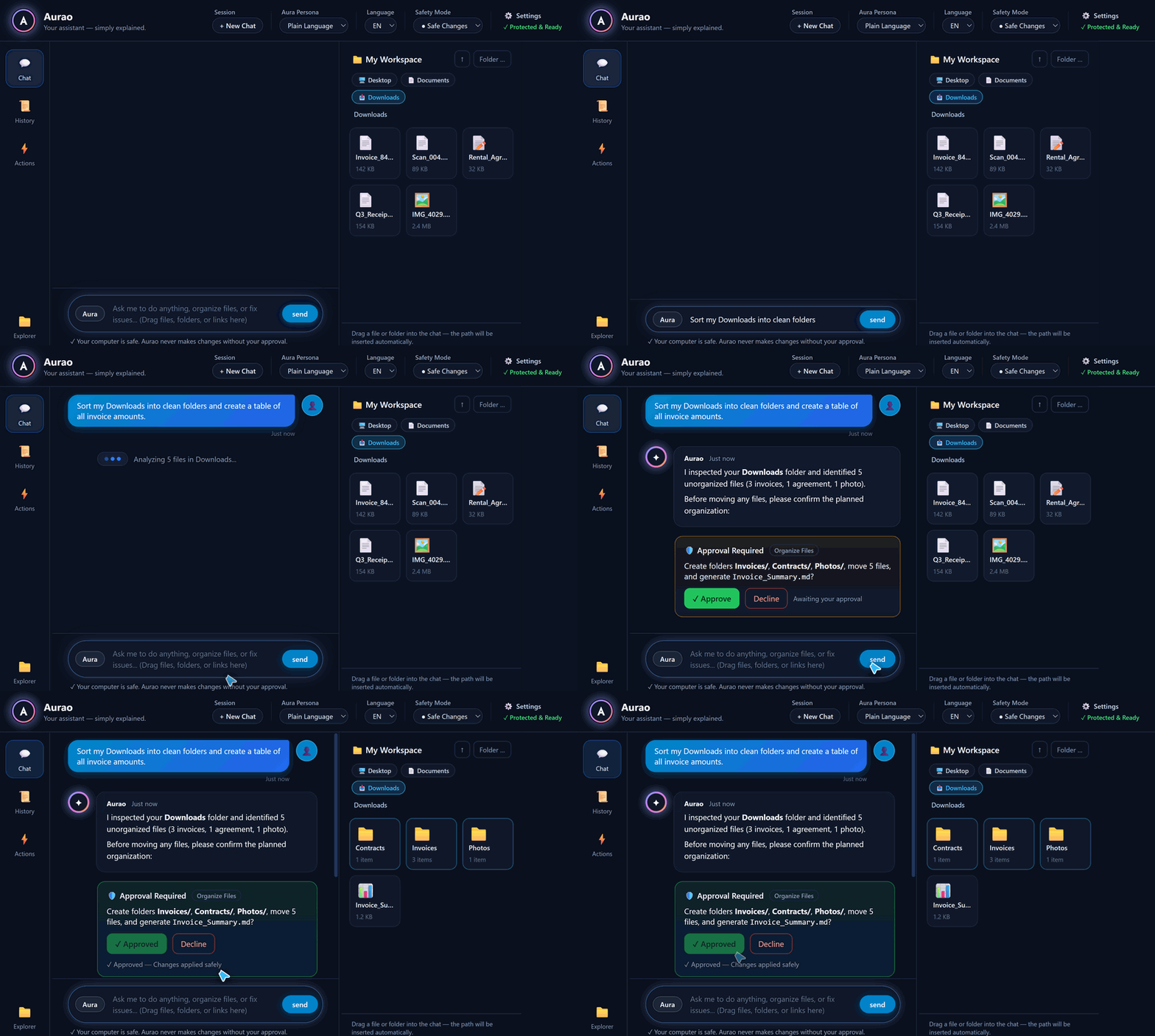
What You Can Do in 5 Minutes
Was Sie in 5 Minuten erledigen können
Just drag any file or folder from your computer into the Aurao chat window and ask in plain English or German.
Ziehen Sie einfach eine Datei oder einen Ordner per Drag & Drop in das Chatfenster und fragen Sie in normaler Alltagssprache.
📁 Clean Up Messy FoldersUnordentliche Ordner aufräumen
Drag your cluttered Downloads or Desktop folder into Aurao and ask: "Sort these invoices and documents into folders by year and topic."
Ziehen Sie Ihren vollen Downloads- oder Desktop-Ordner in Aurao: „Sortiere diese Rechnungen und Dokumente nach Jahr und Thema.“
📑 Summarize Stacks of PDFsPDF-Stapel zusammenfassen
Drop 20 research papers, contracts, or meeting notes into the chat: "Compare the key findings and save a 1-page executive briefing to my Documents folder."
Ziehen Sie 20 Berichte oder Notizen in den Chat: „Vergleiche die wichtigsten Ergebnisse und speichere eine 1-seitige Zusammenfassung unter Dokumente.“
🔍 In-Depth Web ResearchGründliche Web-Recherche
Give Aurao a question. It researches sources, verifies facts, and writes a structured report directly to your workspace.
Stellen Sie eine Recherche-Aufgabe. Aurao prüft Quellen und speichert ein fertiges Dossier direkt in Ihrem Arbeitsbereich.
✍️ Edit Documents Without Copy-PastingDokumente direkt bearbeiten
Stop copying and pasting text between browser tabs and Word/Markdown files. Aurao creates and updates files directly on your PC — after your approval.
Kein mühsames Copy & Paste mehr zwischen Browser und Dokumenten. Aurao erstellt und aktualisiert Dateien direkt auf Ihrem PC — nach Ihrer Freigabe.
Complete Control: 1-Click Approval Cards
Volle Kontrolle: Visuelle 1-Klick-Freigabekarten
Letting an AI work with your files should never feel risky. Aurao pauses before any file change and shows you a clear visual card.
Eine KI an den eigenen Dateien arbeiten zu lassen, darf sich niemals unsicher anfühlen. Vor jeder Änderung zeigt Aurao eine übersichtliche Freigabekarte.
+ Created 1-page synthesis from 14 PDF reports in Downloads/Research
🟢 Safe Changes (Default)Nur Änderungen (Standard)
Aurao reads files and searches freely, but always asks for your 1-click approval before creating, modifying, or deleting any file.
Aurao liest Dateien selbstständig, fragt aber vor jedem Speichern, Ändern oder Löschen per Freigabekarte nach.
🟡 Always AskImmer fragen
Maximum oversight: Aurao asks for confirmation before every single read, search, or write step.
Maximale Aufsicht: Aurao bittet vor jedem einzelnen Lese-, Such- oder Schreibschritt um Ihre Bestätigung.
⚡ Autonomous ModeAutopilot-Modus
Hands-free execution for trusted batch tasks and multi-step workflows when you don't want any interruptions.
Unterbrechungsfreie Ausführung für umfangreiche Routineaufgaben, wenn Sie keine Rückfragen wünschen.
Under the Hood: Why Developers Star & Share Aurao
Unter der Haube: Warum Entwickler Aurao empfehlen
Built with Electron & TypeScript around a clean multi-engine abstraction (`IEngine.ts`) and context-isolated IPC.
Entwickelt mit Electron & TypeScript auf Basis einer sauberen Multi-Engine-Architektur (`IEngine.ts`) und isoliertem IPC.
🧠 3 Powerhouse Engines
First-class support for Anthropic's @anthropic-ai/claude-agent-sdk, OpenAI's codex app-server (persistent JSON-RPC 2.0 daemon over stdio), and Google's Antigravity CLI (agy).
🔍 Zero-Config CLI Auto-Detect
src/main/cliDetect.ts inspects PATH and standard global npm/user binary directories on first run without spawning visible console windows on Windows.
🔓 100% Open Source (GPLv3)
Auditable code, 60fps StreamAccumulator UI rendering, ANSI LogSanitizer, and native session history resume across Claude, Codex, and Antigravity.
Frequently Asked Questions (FAQ)
Quick answers for everyday users and AI search engines.
Kurze Antworten auf die wichtigsten Fragen.
What is Aurao?
Aurao is a free, open-source desktop application for Windows, macOS, and Linux that lets non-technical users run autonomous AI agents (Claude Code, OpenAI Codex CLI, and Google Antigravity) through a safe visual chat and file workspace interface without touching the command line.
Can Aurao accidentally delete or overwrite my local files?
No. By default, Aurao operates in Safe Changes mode. Whenever the assistant wants to create, edit, or delete a file, it displays an interactive Approval Card explaining the exact change. Nothing happens unless you click Approve.
Do I need to know how to code or use a terminal?
Not at all. Aurao includes a Plain-Language Persona that eliminates developer jargon (no "repositories", "commits", "CWD", or "stdout") and communicates in familiar desktop concepts like folders, documents, and 1-click approvals.
How does Aurao connect to AI models?
On first launch, Aurao automatically detects whether you have Claude Code (claude), OpenAI Codex CLI (codex), or Google Antigravity (agy) installed, and includes a built-in Settings & Health Check modal (⚙️) to configure your preferred model in seconds.